
Home Features CAD Import Library Why LOP Pricing About Contact Log In Get Started
Container interior at sunrise
Logistics Optimization Platform

Every container,
perfectly packed.

AI-powered 3D container optimization that plans in seconds, explains every decision, and exports production-ready load plans. Replace spreadsheets and guesswork with intelligent packing.
Start Free
50
Container Types
85%
Avg Fill Rate
~2 s
Typical Quick Plan
3
AI Modes

Built Different.

Modern load planning software, designed for the precision and complexity of industrial freight.

Real CAD Files, Real 3D

Drop in STEP, STL, OBJ, or PLY files and see real part geometry inside your container — not bounding boxes. Most load planners still make you flatten every odd-shaped part into a box; LOP loads the actual mesh, so the plan matches what really ships.

3D Visual Editor

Drag, drop and rotate items in a live 3D scene. Get geometric feedback as you edit, then run Validate to review the current layout’s calculated load checks.

Multi-Container

Plan across multiple containers simultaneously. Side-by-side 3D viewport, per-container or global optimization, automatic item assignment.

Blazing Fast

Typical single-container times: Quick Plan around 2 seconds, Smart Plan around 10 seconds, Maximum Fill around a minute. Times vary with cargo and hardware.

Calculated Load Checks

Review payload, center of gravity, stacking and separation in Validate. See securing forces and truck axle loads calculated from your data. Explore the calculations.

Analytics & Export

PDF load plans, Excel reports, CSV packing lists. Historical analytics dashboard with utilization trends and cost savings.

Your Command Center for Cargo.

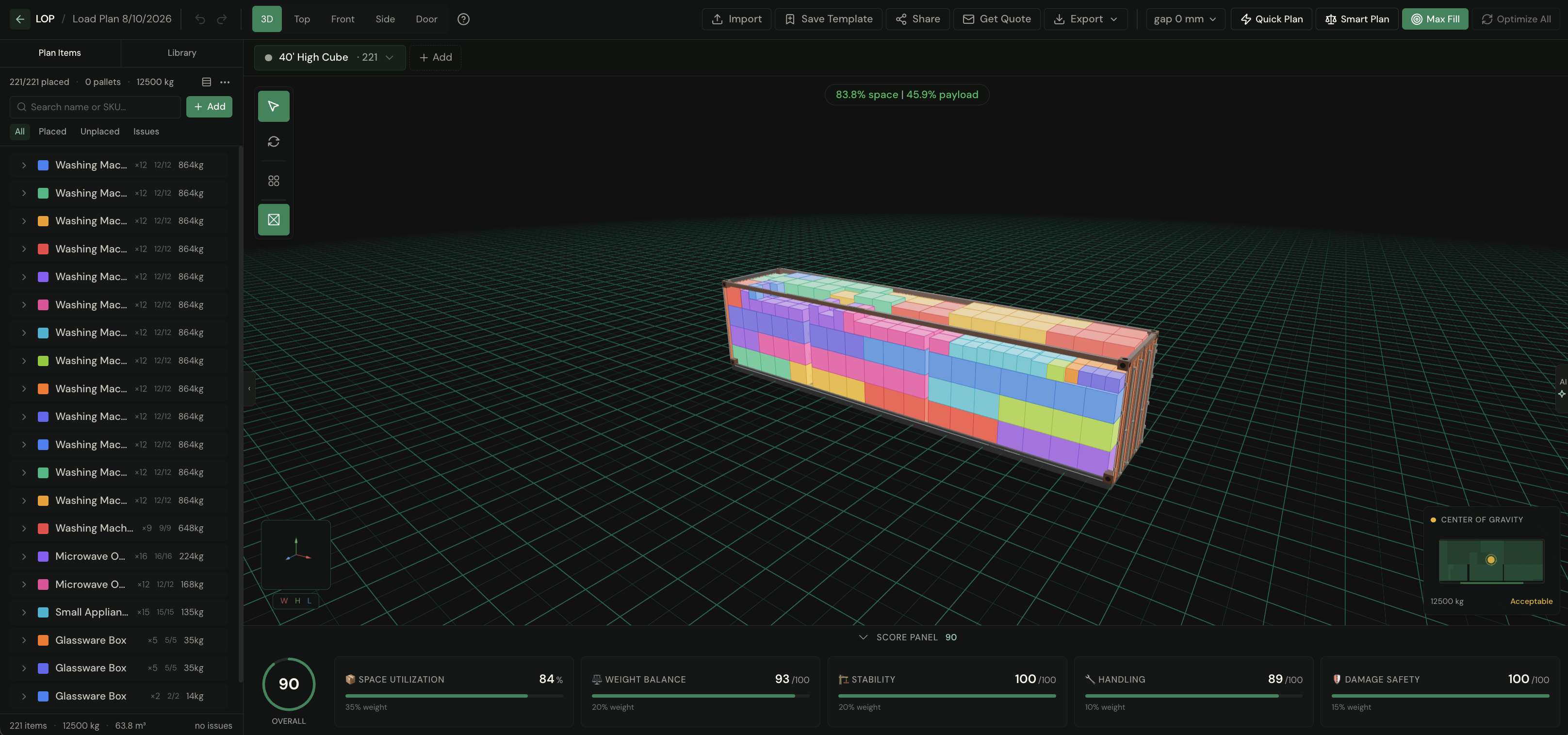
LOP editor with a fully packed 40' High Cube — 221 of 221 items placed, score panel and center-of-gravity monitor open

Your Data, Straight In.

No more hand-built packing lists. However your cargo data lives, it lands in LOP in seconds.

SAP & Oracle

SAP IDoc XML and SAP or Oracle CSV exports are recognized on sight and mapped deterministically — no AI touches them. Same file, same result, every time.

Excel & CSV, with AI

For everything else — Excel sheets with messy headers, dimensions crammed into one column, Turkish labels — AI proposes the mapping, deterministic code executes it, and it asks when it isn't sure. You approve every column before a single value moves.

Import to a plan, or straight into your library for next time.

Three Steps to Perfect Loading.

1

Add Your Items

Import from Excel, CSV, or SAP — AI maps your columns automatically and asks when it isn't sure.

2

AI Optimizes

Choose Quick, Smart, or Maximum Fill mode. Follow the solver’s progress in real time — best fill so far — and stop any time to keep the best plan found.

3

Export & Ship

PDF load plans, Excel reports and CSV packing lists with numbered loading sequences. Review the calculated checks in the PDF. AI insights are available in PDF and Excel when the plan has a current analysis.

Out the Other Side: Documents Your Warehouse Can Use.

A load-plan PDF with container views, a step-by-step loading sequence, and the full packing list. A CSV your WMS can swallow. An Excel workbook with scores and calculated load checks. And when it's time to ship: a branded quote PDF sent to your forwarders from your own Outlook. From 3D plan to paperwork in one click — in English or Turkish.

Start Optimizing Today.

Free to try. No credit card required. See the difference AI-powered load planning makes in minutes.

Get Started Free Talk to Sales